
Push notifications
Booking reminders, confirmations and promos reach clients and staff right on their device — no third-party apps.
- Beauty salons
- Barbershops
- Solo pros
- Studios
- At-home services
- Shops
They arrive where your client is
- Push straight to the phone — just like a regular app
- Mirrored to Telegram and MAKS if the client is there
- A tap opens the right screen — booking, order status or a promo
- Work without installing from a store
You decide what to send and when
- Pre-visit reminders, booking confirmations, order statuses
- Promos and triggered campaigns — by event, no manual work
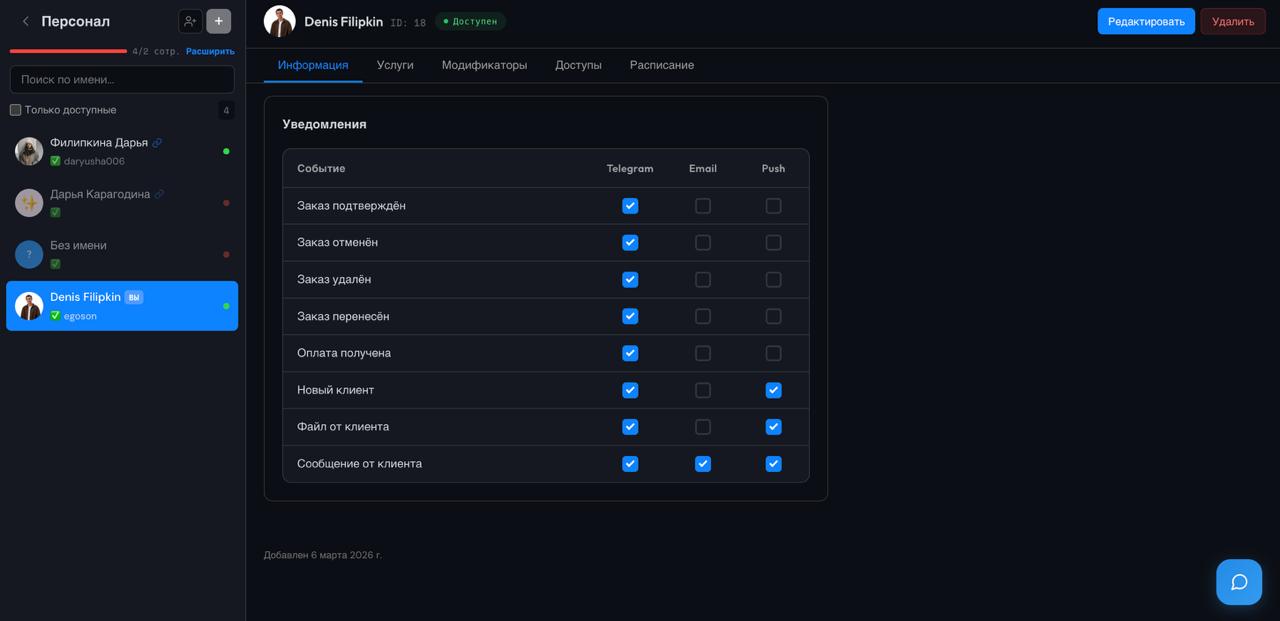
- Separate settings for clients and for staff
How it works
The client enables notifications
On the first visit to the app, allowing notifications is enough — the rest is automatic.
Configure the events
Choose what to notify about: reminders, confirmations, statuses, promos.
Messages send themselves
The platform sends notifications by event — you don't have to do it by hand.
Frequently asked questions
Does the client need to install an app from a store?
No. Notifications arrive right on the device once the client allows them in your app — no App Store or Google Play.
Where do notifications arrive?
As push on the client's phone, and mirrored to Telegram and MAKS if the client uses them. A tap opens the right screen in your app.
What can I send?
Pre-visit reminders, booking confirmations, order statuses, plus promos and triggered campaigns by event.
Do staff get notifications too?
Yes. Staff have their own events and settings: new bookings, schedule changes and more.
Start accepting bookings through messenger
No credit card required. Free plan available.